Job handover and punch list: document it so there is no dispute
At handover, the goal is a written, dated record with photos of what you handed over, in what condition, and what is still to be fixed. That takes three things: your own walkthrough before the inspection, a joint walkthrough with the client, and a punch list where every item has an owner and a deadline.
Contents
- What handover means, and what a punch list is
- 1. Your own walkthrough first
- 2. The handover pack
- 3. What to photograph, and when
- 4. The joint walkthrough
- 5. The punch list and handover record
- 6. Fixing and closing out
- 8. Keep the client, the job and the record together
- Common disputes — and how to prevent them
- Material for the fixes
- Handover checklist
Handover is the last step of a job, and it is often where it is decided whether the job ends without a dispute. The client sees the finished work as a whole for the first time, and that is when the questions come up that should have been answered weeks earlier. If you documented as you went, handover is easy: the evidence already exists and only needs pulling together.
This guide is practical help, not legal advice. What rules apply to your handover — whether there is a formal acceptance, retention or a defects period — depends on your contract and the law where you work. When in doubt, ask a professional.
What handover means, and what a punch list is
Handover is the moment the client takes over the finished work, and a punch list is the written list of small items that are still open at that moment. The two belong together: handover without a list leaves everything vague, and a list without a dated handover record has no anchor.
1. Your own walkthrough first
The best punch list is a short one, and the shortest comes from a walkthrough you do yourself before the client arrives. Go through the job as if you were the one accepting it, room by room, in daylight, and with the lights on as well. Check:
- the visible surfaces (tiles, paint, grout, sealant, joints, edges and transitions);
- everything that has to work (taps, drains, doors, windows, switches, sockets);
- cleaning and the state of the site, including leftover packaging and tools;
- details the client will touch every day: handles, hinges, thresholds, the first and last tile at a door.
Fix what you find before handover. What cannot be fixed straight away — for example a material that has to be re-ordered — write down with a date and a plan. It is much better that you raise it than that the client finds it.
2. The handover pack
The handover pack is the set of documents and photos that goes with the finished work, so the client knows what is in the walls and how to look after it. A good pack contains:
- photos of hidden work — waterproofing, cables and pipes behind the plaster, substrate, framing;
- product data sheets and warranty cards for the installed materials and appliances;
- care and maintenance instructions (for example for sealant, grout, sanitaryware, wood or stone);
- the list of variations (change orders), if there were any;
- spare material information: product name, colour and batch or series, so a damaged piece can be matched later.
If you documented as you went, most of the pack is already there. The part that cannot be recreated afterwards is the photos of hidden work: once the wall is closed or the floor is covered, they are the only evidence of what is under the surface.
3. What to photograph, and when
Photograph the things that will be covered, at the moment before they are covered, with something that shows where it is. A practical set:
- Before you start — the existing condition of each room, especially anything already damaged, so nobody blames you for it later.
- Substrate and preparation — levels, falls, primer, before the next layer goes on.
- Hidden services and waterproofing — a wide shot to show where, and a close shot to show the detail.
- Materials as delivered and as approved — the labels, the batch, the sample the client signed off.
- Each room finished — a wide shot from the door and close shots of the edges, corners and transitions.
- Anything that went differently — the problem as found, and the solution you chose.
Take a wide shot first and details second. A close-up of a joint tells nobody which wall it is on. If a photo needs context, add one line of text with it when you take it, not three weeks later.
4. The joint walkthrough
The joint walkthrough is where you and the client go through the finished job together and agree, item by item, what is accepted and what is not. Do it in daylight, with enough time, and with the person who actually decides on the client’s side present.
- Go room by room and ask in each one whether they see anything to raise.
- Whatever comes up, write it down there and then — not as a promise, but on the punch list.
-
- Have the photos from the job at hand. If the client asks what is under the tiles, you can show them instead of explaining.
5. The punch list and handover record
The handover record is the key document: it states what the client accepted and what is still open. A practical layout:
| Section | Content |
|---|---|
| Basics | job name and address, the parties, date of the walkthrough |
| Work handed over | what the handover covers (contracted work, variations) |
| Punch list | per item: where, what, photo, owner, deadline |
| Documents handed over | the list of the handover pack |
| Notes | where the parties disagree, with both positions |
| Signatures | both parties, with the date |
Every punch-list item should be specific: “Bathroom, wall next to the shower: grout missing in two places” — not “redo grouting”. A specific item can be ticked off; a vague one cannot. Give every item an owner (you, a subcontractor, the client for something they supply) and a deadline. An item without an owner is an item nobody fixes, and one without a deadline is one that is still open in six months.
Also write down what is not a snag: things the client has agreed to leave, or that were outside the agreed work. That keeps the list from growing into a second job.
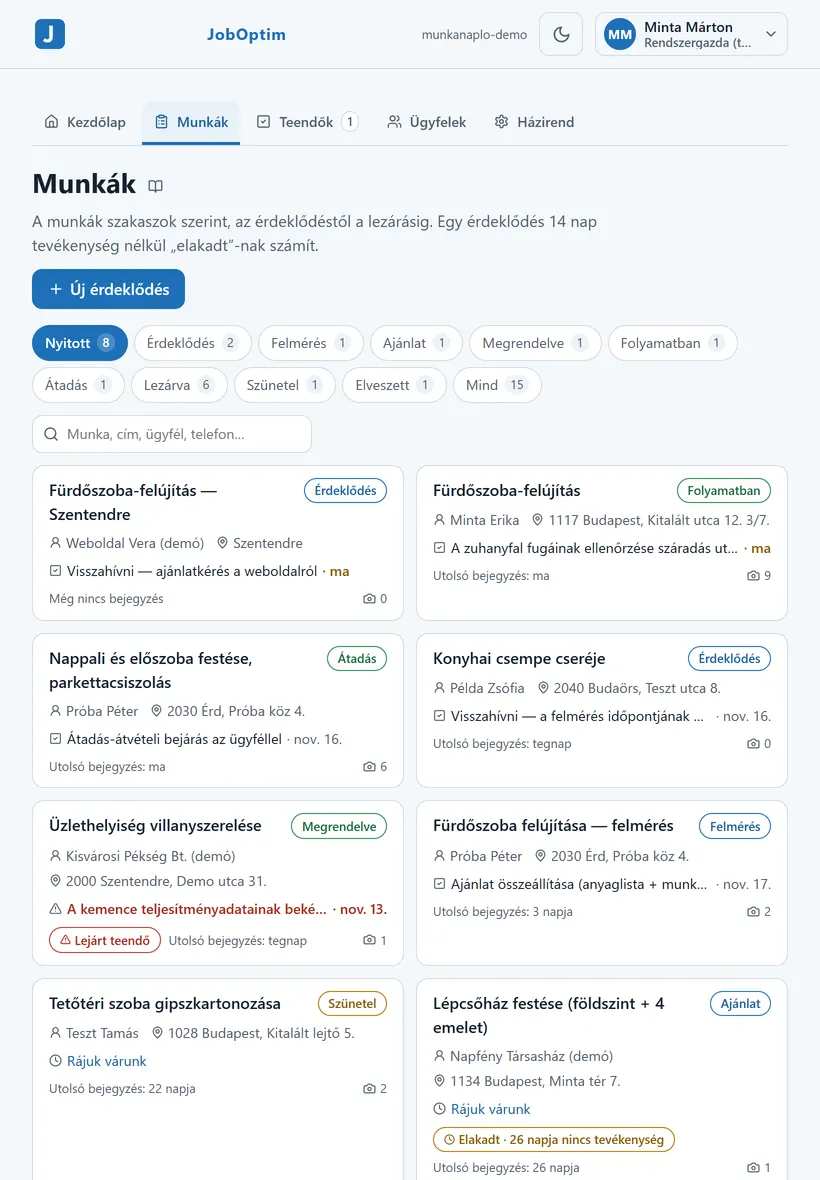
In JobOptim, handover is a stage of the job, so the jobs waiting for a walkthrough are visible in the job list at a glance. The punch-list items can live on the job as tasks, each with an owner and a deadline, next to the photos that belong to them. The company can also require a final report or an “after” photo before a job can be closed, as a warning or as a hard stop, so a job does not get closed with the record still empty.
6. Fixing and closing out
Signing is not the end. Fix the punch-list items by the deadline and document the fixes too:
- a photo of the repaired spot (from the same position as the snag photo);
- the date and a short description;
- the client’s confirmation that the item can be closed.
When every item is closed, record that in writing too, and send it to the client. The job then ends on the record. ## 7. The report and what the client sees
A handover report is a document that shows the client the job as a whole: what was done, in what order, with photos. It is not the same as the handover record, but the two work together, because the report is the evidence behind the record.
JobOptim builds a PDF report with full-quality photos from the entries marked as client-visible. The finalised version is numbered and its entries are locked, so the version shown at handover stays the same. During the job, the client can follow progress through a progress link or QR code — a page that shows only the entries you marked as visible, without an account. You can revoke the link, and it expires a set time after the job is closed, so the page does not stay open indefinitely. If the client has already seen the key stages as they happened, nothing at the walkthrough is a surprise.
8. Keep the client, the job and the record together
Handover is easier when the client’s contact details, all their jobs and the emails you sent are in one place.
In JobOptim every client has a client sheet with their contact details, notes and all their jobs, and emails sent from a job stay on that job. When a client calls about a snag a year later, you open the client, see the job, the photos and the correspondence, and answer from the record rather than from memory.
If you have your own company website in JobOptim, finished jobs can also turn into references with photos, with the client’s consent. Ask for that consent at handover, when the client is happiest, and write it down in the handover record. A quote request that comes in through the website arrives as a job, so the next job starts in the same place where the last one ended.
Common disputes — and how to prevent them
- “That is not what we agreed.” If something changed during the job (a different material, a different solution, extra work), the change needs a dated record: who asked, when, and what it meant for the job.
- “What is under the tiles?” Photos of the hidden work show what was done and in what order.
- “When was it finished?” The dates in your job log show what happened when, and what caused any delay.
- The client will not sign. Record at least the walkthrough and its date, and both parties’ positions. What that means depends on your contract and local law — get advice if it turns into a dispute.
Material for the fixes
If a snag needs extra material, the CutOptim tile calculator helps you work out the quantity. For the whole path from material estimate to handover, see the CutOptim guide.
More: features · tiling · paving.
Handover checklist
- Own walkthrough done, issues found are fixed
- Handover pack complete (photos, data sheets, warranties, care instructions)
- Joint walkthrough in daylight, room by room
- Punch list with specific items, owners and deadlines
- Signed by both parties, copy for the client
- Fixes documented with photos, close-out recorded in writing
This guide is practical help, not legal advice.
Frequently asked questions
What is a punch list?
A punch list is the list of small open items found at handover: snags, unfinished details and corrections. Each item should say where it is, what is wrong, who fixes it and by when, ideally with a photo.
What should a handover pack contain?
Photos of hidden work, product data sheets and warranty cards for installed materials and appliances, care and maintenance instructions, records of any tests done during the job and the list of variations, if there were any.
What if the client will not sign the handover record?
Record the walkthrough, its date and both parties’ positions in writing, and send it to the client. What that means legally depends on your contract and local law, so get advice if it turns into a dispute.
How do I document that a punch-list item has been fixed?
Photograph the repaired spot from the same position as the snag photo, note the date and a short description, and get the client’s written confirmation that the item can be closed.
How JobOptim helps
In JobOptim the entry is made on site, with photos and a timestamp, attached to the job; your client sees the entries meant for them on a link, and at handover a PDF report is built from them. Each client’s details, jobs and emails sit in one place, and quote requests from your own company website arrive straight as jobs.